Orvian Market › Client email templates
15 Client Email Templates for Freelancers, Word and PDF
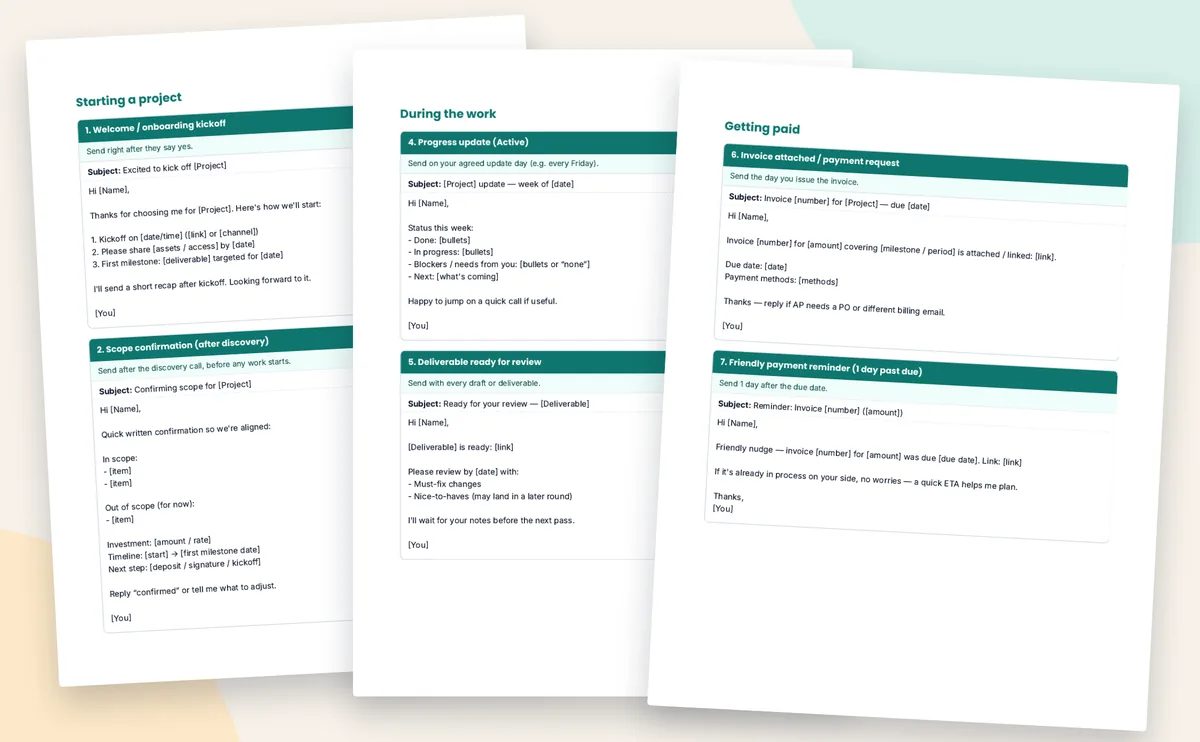
One short email for each step of a client project, from the welcome email to the testimonial ask. Each has a subject line and a line saying when to send it. Copy it, fill in the [brackets], send it to one client.
$12one-time on Etsy · editable Word file and print-friendly PDF, 11 pages
Want a client system around them? The Freelance Business Bundle has the Notion client CRM (which includes these same 15 emails) plus the rate calculator, the rate increase emails and the irregular income budget: $34 for all four instead of $59 bought separately (list prices).
- 15 emails in five stages: starting, during the work, getting paid, pricing and saying no, wrapping up
- Scope creep, invoice, a 1-day and a 7-day payment reminder, rate raise and a polite pass
- A when-to-send line on every email, and a before-you-send checklist
- Word file also opens in Google Docs and Pages
![Email 13, the scope creep email, in a mail window: subject Scope note on [extra request], with two options, a change order or a phase 2 (listing image)](/assets/client-email-scope-creep.svg)
Worked example
One website project, start to finish
Example only: a made-up freelance web designer building a five-page site for a physio clinic (client: Dana), $2,400 fixed with a $1,200 deposit. Each row is the email the file's when-to-send line points to on that day.
| Date | Why that day | |
|---|---|---|
| Mon Nov 2 | 1. Welcome / onboarding kickoff | Dana says yes to the five-page site |
| Wed Nov 4 | 2. Scope confirmation (after discovery) | After the discovery call, before any work starts |
| Mon Nov 9 | 3. Kickoff summary (post-call) | A few hours after the kickoff call |
| Fri Nov 13 | 4. Progress update (Active) | Your agreed update day, Fridays |
| Tue Nov 17 | 13. Boundary / scope creep (kind but clear) | Dana asks for an online booking page too |
| Fri Nov 20 | 5. Deliverable ready for review | Homepage draft ready |
| Fri Dec 4 | 6. Invoice attached / payment request | Site launched; balance invoice for $1,200 due Mon Dec 14 |
| Tue Dec 15 | 7. Friendly payment reminder (1 day past due) | Still unpaid 1 day after the due date |
| Mon Dec 21 | 8. Second payment follow-up (≈7 days past due) | Still unpaid about 7 days after |
| Wed Dec 23 | 15. Pause / wrap confirmation | Paid Dec 22; confirm the wrap |
| Wed Dec 23 | 14. Testimonial / referral ask (after Done + paid) | Done and paid, so ask for a testimonial |
Emails 9, 10, 11 and 12 weren't needed on this project: the rate raise, the polite pass, the proposal follow-up and re-engaging a past client.
Email 13, filled in for Dana
Dana asks for an online booking page on Tue Nov 17. The scope creep email exactly as it is in the file, with the brackets replaced (made up):
If Dana picks option 1, the $450 change order goes on its own invoice; if option 2, it waits for a phase 2 after launch. Example only.
What's in it
All 15 emails, by stage
The Word file and the PDF hold the same 11 pages: a contents table, the 15 emails grouped by stage, and a short before-you-send checklist. The numbering follows the original swipe file, so 13 sits with the work and 12 with coming back.
| Email and subject line | When to send |
|---|---|
| Starting a project | |
| 1. Welcome / onboarding kickoff Subject: Excited to kick off [Project] | Send right after they say yes. |
| 2. Scope confirmation (after discovery) Subject: Confirming scope for [Project] | Send after the discovery call, before any work starts. |
| 3. Kickoff summary (post-call) Subject: Recap + next steps — [Project] | Send within a few hours of the kickoff call. |
| During the work | |
| 4. Progress update (Active) Subject: [Project] update — week of [date] | Send on your agreed update day (e.g. every Friday). |
| 5. Deliverable ready for review Subject: Ready for your review — [Deliverable] | Send with every draft or deliverable. |
| 13. Boundary / scope creep (kind but clear) Subject: Scope note on [extra request] | Send as soon as an extra request appears. |
| Getting paid | |
| 6. Invoice attached / payment request Subject: Invoice [number] for [Project] — due [date] | Send the day you issue the invoice. |
| 7. Friendly payment reminder (1 day past due) Subject: Reminder: Invoice [number] ([amount]) | Send 1 day after the due date. |
| 8. Second payment follow-up (≈7 days past due) Subject: Follow-up on Invoice [number] | Send about 7 days after the due date. |
| Pricing and saying no | |
| 9. Rate raise (existing client, renewal / new phase) Subject: Updated rates for [next period / next project] | Send 30+ days before the new rate starts. |
| 10. Polite pass (not a fit) Subject: Re: [Project inquiry] | Send when the budget or scope isn't a fit. |
| 11. Soft follow-up after proposal (no reply) Subject: Checking in — [Project] proposal | Send 5–7 days after a proposal with no reply. |
| Wrapping up and coming back | |
| 14. Testimonial / referral ask (after Done + paid) Subject: Quick favor? (testimonial or intro) | Send after the project is done and paid. |
| 15. Pause / wrap confirmation Subject: Confirming pause / wrap on [Project] | Send when a project ends or goes on hold. |
| 12. Re-engagement (Paused / old Done client) Subject: Still helpful for [topic / service]? | Send to a past client when you have availability. |
Titles, subject lines and timing copied from the file.
Before you hit send
The last page is a five-point check:
- The person asked for this conversation, or is a client or warm lead
- No fake deadlines or "only one spot left" pressure
- No legal, medical or guaranteed-results claims
- Every [bracket] is filled in
- You'd be happy to receive this email yourself
Already have one of our packs?
What overlaps, plainly
Notion client CRM: same 15 emails
- The Notion client CRM template ($24) has these same 15 emails, word for word, plus a client pipeline, an invoice log and an onboarding checklist.
- Only want the emails? This $12 pack is the cheaper way. Own the CRM already? You don't need this.
Onboarding pack: emails 1 to 3
- The client onboarding checklist template has emails 1 to 3 (welcome, scope confirmation, kickoff recap), the same wording, with a 26-item checklist.
Payment reminders: emails 6 to 8
- The payment reminder email templates share emails 6 to 8, and add a firmer 14-day email and an Excel invoice tracker.
Rate increase emails: different
- The rate increase email templates are four different emails (proposal, notice, polite pass, pushback reply). This pack has one shorter rate raise email, number 9.
Your options
Free client email templates, or this
We read three free ones. Each beats this pack at something.
Gatilab Client Communication Swipe File, free
- 14 scripts in a free PDF for the hard ones: late payment, repeated small extras, revisions past the agreed rounds, waiting on the client, a client gone quiet, a missed deadline, your own mistake, declining work, ending an engagement.
- The better pick for difficult conversations; this pack doesn't cover most of those.
Begin Things client message templates, free
- A no-sign-up browser tool that drafts ten common messages, three payment reminders, scope change, rate increase, kickoff, proposal follow-up, testimonial, polite refusal and invoice note, in a friendly or formal tone, as email or WhatsApp. It counts days overdue for you.
- The better pick if you just need one message written fast, or you work over WhatsApp.
Bryn Taylor's 8 email templates, free
- Eight short copy-paste emails on a web page, including replying to an inquiry, cold outreach, out of office and announcing a new service, which this pack doesn't have.
- Good if you want a few quick ones and don't need a file.
These 15 emails, $12 once
- One email for each step of an ordinary project, in order, each with a subject line and a when-to-send line, as an editable Word file and a PDF.
- No cold outreach and no bad-news scripts. What you're paying for is the full start-to-finish set in one document you can keep and edit.
Sources, read Oct 31, 2026: Gatilab Client Communication Swipe File (PDF) · Begin Things client message templates · Bryn Taylor, 8 free email templates for freelancers. All three were free that day. Content changes; check their pages.
FAQ
Questions, answered straight
Are there free client email templates for freelancers?
Yes, and some are better for certain jobs. Gatilab's free Client Communication Swipe File has 14 scripts for hard conversations this pack doesn't cover, like a missed deadline, your own mistake or a client who has gone quiet. Begin Things has a free browser tool that drafts ten common client messages, in a friendly or formal tone, as an email or a WhatsApp message. Bryn Taylor shares 8 short ones, including cold outreach. This pack is for people who want one email for each step of a normal project, in order, with a when-to-send line and subject line on every one, as a Word file.
Are these the same emails as in the Notion client CRM?
Yes. They're word for word the same 15 emails as the email page in our Notion client CRM template (Freelance Client OS). This pack adds a when-to-send line on each email and a before-you-send checklist, as Word and PDF. If you only want the emails, this is the cheaper way. You don't need both.
Do they overlap with your other email packs?
Partly. Emails 1 to 3 are the same as the three emails in the client onboarding checklist pack, and emails 6 to 8 are the same as the first three emails in the payment reminder pack. That pack adds a fourth, firmer email for about 14 days late and an invoice tracker. The rate increase pack is different wording: a proposal email, a rate increase notice, a polite pass and a pushback reply. This pack has one shorter rate raise email.
Can I edit them?
Yes. The Word file is fully editable and also opens in Google Docs and Pages. The PDF is for printing or reading.
Are they for cold emailing?
No. They're for one-to-one emails with clients and people who contacted you, not mass mailings. The file says so on the first page.
Is there legal wording in them?
No. They're plain business emails, not legal notices or contract terms. Email 8 mentions pausing new work 'per our agreement', so only send that line if your agreement says so.
Never start a client email from blank again.
$12 once on Etsy. Instant download: the 15 emails as an editable Word file and a print-friendly PDF.