Orvian Market › Notion client CRM
Notion Client CRM Template for Freelancers, Plus 15 Emails
A simple Notion client CRM for freelancers: one database that moves each client from Lead to Done, an invoice and payment log, a new-client onboarding checklist and 15 client emails for the moments in between.
$24one-time on Etsy · one-click Notion Duplicate, plus Markdown and CSV files
Need more than this one? The Freelance Business Bundle has this Notion CRM plus the rate calculator, the rate increase emails and the irregular income budget: $34 for all four instead of $59 bought separately (list prices).
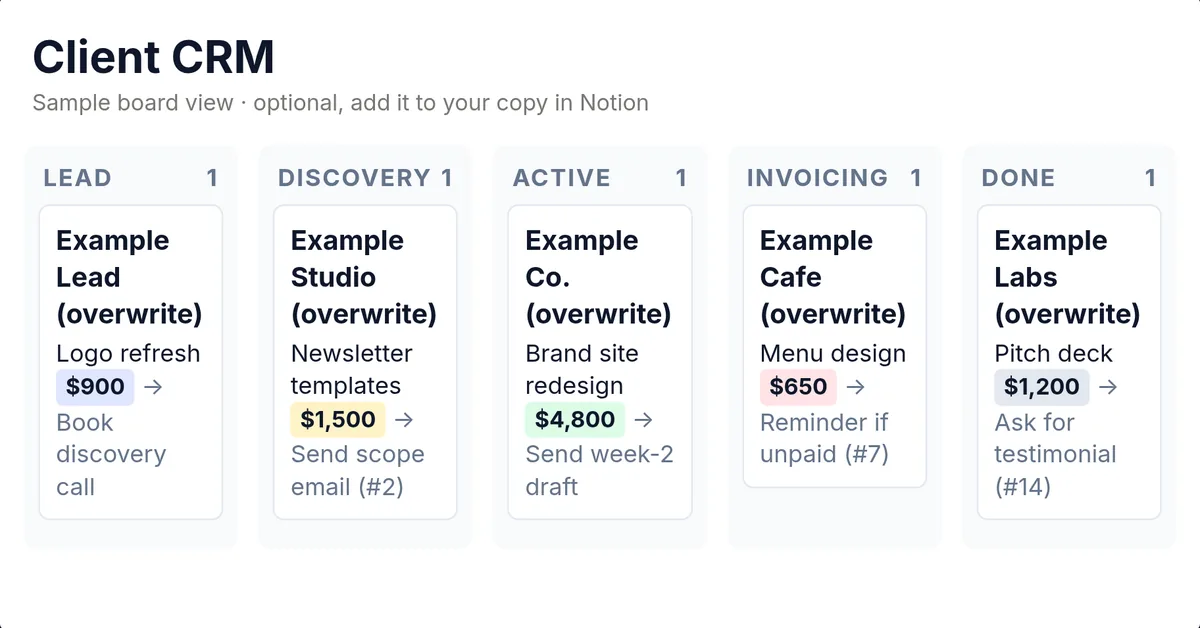
- Client CRM with 14 columns and six stages: Lead, Discovery, Active, Invoicing, Done, Paused
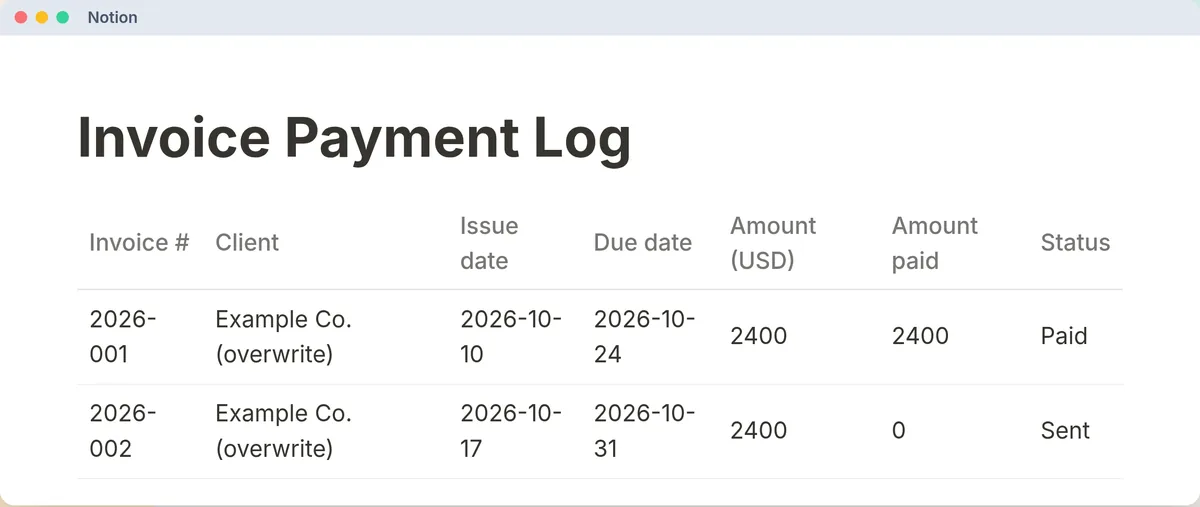
- Invoice & Payment Log with seven statuses, from Draft to Paid
- Onboarding checklist (26 items, A to E) and 15 client emails
- Works on Notion's free plan; files also open in Google Docs and Sheets
Worked example
A Monday review with seven clients
Example only: a made-up freelancer's CRM on Monday, November 16, 2026. The template doesn't compute any of this; it's what the CRM guide's quick filters and the weekly 15-minute review turn up when you run them.
| Client | Status | Est. value | Next action | Date |
|---|---|---|---|---|
| Pine Street Dental | Lead | $1,200 | Book discovery call | Nov 17 |
| Northside Yoga | Lead | $900 | none | — |
| Juniper Studio | Discovery | $1,500 | Send scope email (#2) | Nov 16 |
| Fieldstone Realty | Active | $4,800 | Send week-2 draft | Nov 18 |
| Copper Kettle Cafe | Invoicing | $650 | Reminder if unpaid (#7) | Nov 16 |
| Ridge Labs | Done | $1,200 | Ask for testimonial (#14) | Nov 20 |
| Alder Books | Paused | $600 | Check in on budget | Dec 1 |
What the filters and the review show
| Filter or review question | Result in the example |
|---|---|
| Status = Lead OR Discovery → sales pipeline | 3 clients worth $3,600 (Pine Street Dental, Northside Yoga, Juniper Studio). |
| Status = Active → delivery load | 1 client, Fieldstone Realty, $4,800. Next deliverable date is set (Nov 18), so the review's Active question is clear. |
| Status = Invoicing → cash collection | Copper Kettle Cafe, invoice 2026-013 for $650, 3 days past its Nov 13 due date. |
| Next action date ≤ today → daily to-do | 2 for today: Juniper Studio (send the scope email, #2) and Copper Kettle Cafe (reminder, #7). |
| Lead older than 7 days without a next step | Northside Yoga: no next action and 11 days since last contact. Follow up or archive. |
| Done client for a referral ask | Ridge Labs, paid in full, so email 14 (testimonial or intro) fits. |
The invoice log, same day
| Invoice | Client | Due | Status | Unpaid | Collection rhythm says |
|---|---|---|---|---|---|
| 2026-010 | Ridge Labs | Nov 1 | Paid | $0 | — |
| 2026-011 | Fieldstone Realty | Nov 2 | Paid | $0 | — |
| 2026-012 | Alder Books | Nov 6 | Overdue | $600 | 10 days late, Email 8, firmer follow-up |
| 2026-013 | Copper Kettle Cafe | Nov 13 | Sent | $650 | 3 days late, Email 7, polite reminder |
Outstanding, as the log defines it (Sent + Viewed + Partial + Overdue, unpaid remainder): $1,250. The log's rhythm: polite reminder (email 7) the day after the due date, firmer follow-up (email 8) at 7 days, pause new work at 14 days if your terms allow. Example data, made up.
Email 7, filled in for Copper Kettle Cafe
The reminder exactly as it is in the file, with the brackets replaced (made up):
If it's still unpaid on Fri Nov 20, seven days past due, email 8 is next.
What's in it
Two databases, six pages, 15 emails
The Duplicate link copies the whole system into your Notion: the Client CRM and Invoice & Payment Log databases (with example rows to delete) and six pages: Start Here, the CRM guide, the onboarding checklist, the invoice log guide, the email templates and a short pricing page. The zip has the same thing as 6 Markdown pages and 2 CSV files.
CRM columns: Client name, Contact, Email, Source, Status, Offer / service, Est. value (USD), Rate type, Next action, Next action date, Last contact, Kickoff date, Contract link, Notes.
Invoice log columns: Invoice #, Client, Issue date, Due date, Amount (USD), Amount paid, Status, Method, Milestone, Reminders, Notes.
When a client moves stage
| From → to | Ready when… |
|---|---|
| Lead → Discovery | They replied and a call/async scope is booked or started |
| Discovery → Active | Scope + price agreed; kickoff scheduled; deposit received if you require one |
| Active → Invoicing | Milestone accepted or period ended; invoice drafted |
| Invoicing → Done | Paid in full (or write-off logged) and engagement closed |
| Any → Paused | Mutual hold; next check-in date set |
| Paused → Active | Hold lifted; new kickoff or resume date set |
Wording from the CRM guide.
The 15 emails
| # | |
|---|---|
| 1 | Welcome / onboarding kickoff |
| 2 | Scope confirmation (after discovery) |
| 3 | Kickoff summary (post-call) |
| 4 | Progress update (Active) |
| 5 | Deliverable ready for review |
| 6 | Invoice attached / payment request |
| 7 | Friendly payment reminder (1 day past due) |
| 8 | Second payment follow-up (≈7 days past due) |
| 9 | Rate raise (existing client, renewal / new phase) |
| 10 | Polite pass (not a fit) |
| 11 | Soft follow-up after proposal (no reply) |
| 12 | Re-engagement (Paused / old Done client) |
| 13 | Boundary / scope creep (kind but clear) |
| 14 | Testimonial / referral ask (after Done + paid) |
| 15 | Pause / wrap confirmation |
Your options
Free Notion CRMs, or this
We read the free ones in Notion's template gallery. As CRMs, the best of them do more than ours.
Templitize Client CRM (Lite), free
- Two linked databases, Clients and Interactions. Log a call or email with a follow-up date and the client's follow-up status (Overdue, Due soon, On track) works itself out. Pipeline board, dashboard, sample rows.
- The better pick if you want follow-ups tracked for you. No emails or onboarding checklist.
Noel's Freelancer Client & Project OS, free
- CRM, lead pipeline and follow-ups, plus projects, tasks, deadlines and an invoice tracker, with discovery-call, onboarding, kickoff and offboarding pages.
- The better pick if you also want project and task management in the same workspace.
Recordwell Simple Client CRM, free
- One client database with a pipeline board grouped by stage and automatic follow-up flags from a Next Action Date.
- The better pick if you want the simplest possible CRM that still flags who's gone cold.
This Client OS, $24 once
- Two plain databases with no formulas or relations, and you add the board view yourself. Simpler than the free ones as a CRM.
- What you're paying for: 15 client emails, the onboarding checklist, stage exit rules and a payment-collection rhythm, plus Markdown and CSV copies that work outside Notion.
Sources, read Oct 31, 2026: Templitize Client CRM (Lite) · Freelancer Client & Project OS · Simple Client CRM for Small Businesses. All three were listed free that day. Content changes; check their pages.
FAQ
Questions, answered straight
Is there a free Notion client CRM template?
Yes, several, and some do more than ours. Templitize's Client CRM (Lite), Noel's Freelancer Client & Project OS and Recordwell's Simple Client CRM are all free in Notion's template gallery and work out follow-ups for you. If a CRM is all you want, start with one of those. This one is for people who also want the 15 client emails, the onboarding checklist and the written rules for when a client moves stage.
Does it work on Notion's free plan?
Yes. The Start Here guide says a free Notion account works: open the template link, click Duplicate and pick your workspace.
Is it a Notion link or files?
Both. The Start Here PDF has the one-click Duplicate link, and a zip holds the same system as six Markdown pages and two CSV databases, so you can import it yourself or keep it outside Notion.
Does it calculate anything for me?
No. The two databases are plain tables with no formulas and no links between them; you update Status and Next action date yourself. Notion can still filter, sort and sum a column. The worked example on this page shows the five quick filters the CRM guide suggests.
Does it come with a board view?
Not built in. The guide's setup step is to add a Board view grouped by Status in your copy, which takes a few clicks in Notion. The board in the listing image is a sample of that view.
Can I use it without Notion?
Yes. The Markdown files open in Google Docs, Obsidian or any notes app, and the CSV files open in Excel or Google Sheets.
Is it legal or accounting software?
No. It's an ops template for running clients, not a legal CRM, accounting software or tax advice. Use your own contracts.
Know where every client stands.
$24 once on Etsy. Instant download: the one-click Notion Duplicate link in a Start Here PDF, plus the Markdown and CSV files.