Orvian Market › Payment reminder emails
Payment Reminder Email Templates and Invoice Tracker
Four polite emails that take an invoice from the day you send it to the day it's paid, a calm follow-up schedule, and an invoice log that works out the balance, the status and how many days late each one is.
$9one-time on Etsy · Word, PDF and Excel/Google Sheets
- Emails A to D: invoice, friendly reminder, second follow-up, final note
- Follow-up schedule from day 0 to paid, also on the tracker's Summary tab
- Invoice log: balance, Paid / Partial / Open / Overdue and days overdue calculate
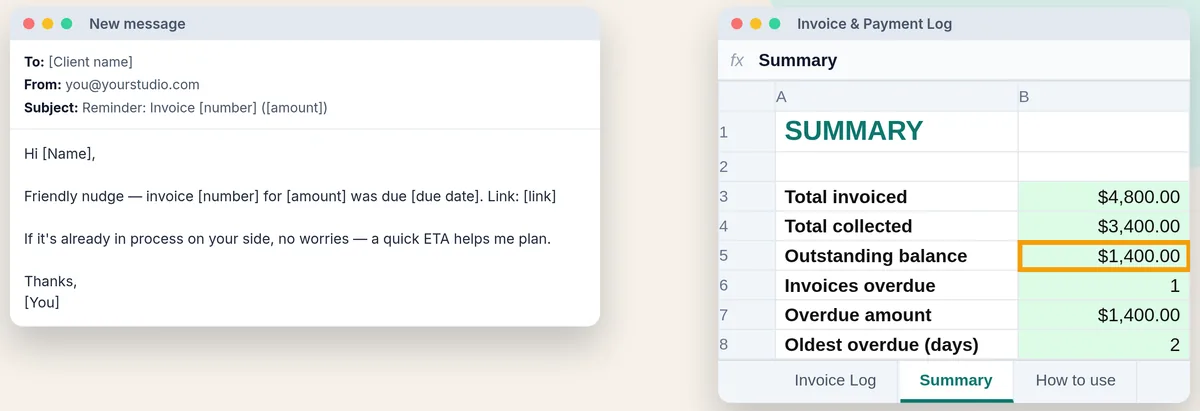
- Summary: invoiced, collected, outstanding, overdue count and oldest overdue
Worked example
One late invoice, and which email to send
The two made-up example rows that ship in the tracker, opened on Oct 30, 2026. Status and days overdue use today's date, so they move on their own each day.
| Invoice | 2026-001 | 2026-002 |
|---|---|---|
| Milestone | Deposit 50% | Final 50% |
| Due date | Sep 24 | Oct 15 |
| Amount | $2,400 | $2,400 |
| Amount paid | $2,400 | $1,000 |
| Balance | $0 | $1,400 |
| Status | Paid | Overdue |
| Days overdue | 0 | 15 |
| Reminders sent | 0 | 1 |
Example data, made up. The Summary tab reads $4,800 invoiced, $3,400 collected, $1,400 outstanding, 1 invoice overdue for $1,400, oldest 15 days. (The listing images were captured on Oct 17, when this invoice was 2 days late.)
The follow-up dates for invoice 2026-002
| Send on | |
|---|---|
| Email A, invoice | Oct 1 |
| Email B, friendly reminder | Oct 16 |
| Email C, second follow-up | Oct 22 |
| Email D, final note (only if your terms allow pausing work) | Oct 29 |
At 15 days late with 1 reminder sent, this client has had email B but not C. Send C now (it asks whether the invoice is queued with AP or needs correcting) before D. Email D says you'll pause new work, so only send it if your agreement allows that.
How the tracker decides
Paid, Partial, Open or Overdue
Five more made-up invoices typed into the tracker and recalculated on Oct 30, 2026. Balance is amount minus paid; Paid wins first, then Overdue once the due date has passed, then Partial if anything came in.
| Invoice | Balance | Status | Days late |
|---|---|---|---|
| Not due yet, nothing paid | $900 | Open | 0 |
| Half paid, not due yet | $600 | Partial | 0 |
| Due today | $500 | Open | 0 |
| A week past due | $750 | Overdue | 7 |
| Client paid $50 too much | -$50 | Paid | 0 |
Example data, made up. With all seven invoices the Summary shows $4,100 outstanding, 2 overdue for $2,150, oldest 15 days. The $50 overpayment reduces the outstanding total, so credit or refund it.
What's in the emails
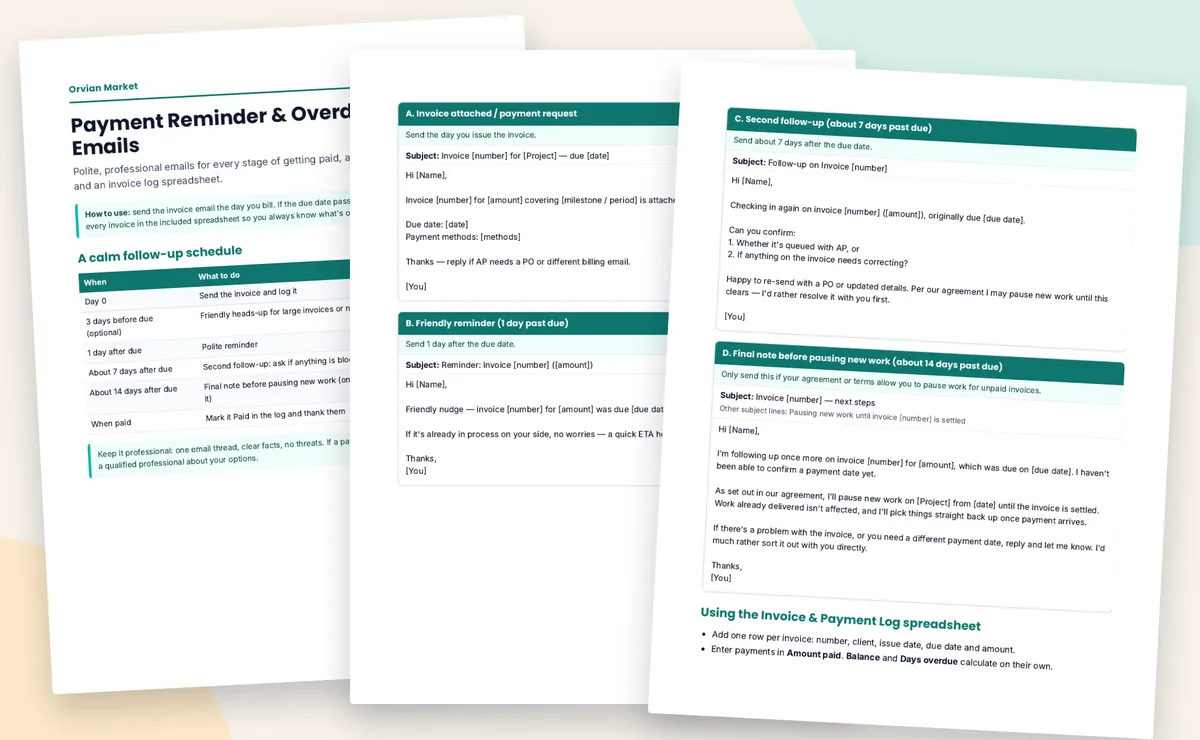
Four emails, one thread, no threats
| When | Subject line | |
|---|---|---|
| A. Invoice / payment request | Day 0 | Invoice [number] for [Project] — due [date] |
| B. Friendly reminder | 1 day after due | Reminder: Invoice [number] ([amount]) |
| C. Second follow-up | About 7 days after | Follow-up on Invoice [number] |
| D. Final note before pausing work | About 14 days after | Invoice [number] — next steps |
Subject lines as they appear in the file; fill in the brackets. The schedule also has an optional heads-up 3 days before the due date for large invoices or new clients.
Your options
Free trackers, free invoicing apps, or this
We downloaded and opened both free trackers. If you only need the spreadsheet, they're enough, and in places better than ours.
RecordSplit invoice tracker, free
- Four tabs, 1,000 rows, a fixed "As of" date you set, statuses including "Due today" and "Partially paid · overdue", input checks on dates and amounts, and a totals check. No sign-up.
- The stronger free tracker. No reminder emails.
CatInvoice invoice tracker, free
- One tab, 200 rows: balance, status, days overdue, follow-up date, overdue total, number checks on amounts. Overpayments don't reduce other invoices' total.
- Enough for a simple log. No reminder emails.
Zoho Invoice, free plan
- If you send invoices from Zoho Invoice, its free plan can send automatic reminders before or after the due date with text you edit.
- Best if you're happy to bill from an app; you still have to write the reminder text.
This kit, $9 once
- The four emails written out (Word and PDF), the follow-up schedule, and a simple 100-row tracker with milestone, method and reminders-sent columns.
- The tracker is simpler than RecordSplit's: no input checks or fixed as-of date. You're paying mainly for the wording.
Sources, checked Oct 30, 2026: RecordSplit · CatInvoice · Zoho Invoice pricing. Features change; check their pages.
FAQ
Questions, answered straight
How do you politely remind a client about an overdue invoice?
Keep it short and factual: the invoice number, the amount, the original due date and the payment link, in the same email thread. The first reminder assumes it slipped through ("Friendly nudge"); the second asks whether it's queued with accounts payable or whether anything on the invoice needs correcting. No threats.
When should I send a payment reminder?
The schedule in the file: send the invoice on day 0, an optional heads-up 3 days before the due date for large invoices or new clients, a friendly reminder 1 day after the due date, a second follow-up about 7 days after, and a final note about 14 days after, only if your agreement lets you pause work.
What does the invoice tracker spreadsheet calculate?
Per invoice: the balance (amount minus amount paid), a status of Paid, Partial, Open or Overdue, and days overdue counted from the due date to today. The Summary tab totals invoiced, collected and outstanding, counts overdue invoices and shows the oldest one in days.
Is an invoice overdue on its due date?
No. The status only turns Overdue the day after the due date (the formula checks today is later than the due date). A partly paid invoice that passes its due date shows Overdue, not Partial, so it doesn't get forgotten.
What if a client pays too much?
The balance goes negative and the invoice reads Paid. The Summary's outstanding total adds up every balance, so an overpayment lowers it; note it and refund or credit the client so your totals stay right.
Can I charge a late fee with these templates?
The emails don't add late fees. Only charge one if your contract or invoice terms say so and it's allowed where you and your client are. This is writing and tracking help, not legal advice.
Does it work in Google Sheets?
Yes. The tracker is a real .xlsx with no macros; in Google Sheets use File → Import → Upload. The emails come as an editable Word file and a PDF.
Know who owes you, and what to send next.
$9 once on Etsy. Instant download: the emails as Word and PDF, and the invoice tracker for Excel and Google Sheets.