Orvian Market › Irregular income budget
Irregular Income Budget Spreadsheet
A budget for uneven months. Log the money that actually arrived, hold back the tax percentage you choose and a small cash buffer, and get one honest number: what's safe to spend this month.
$12one-time on Etsy · Excel and Google Sheets
- Expected vs actually received, so unpaid invoices don't count
- Essential, sinking-fund and flexible categories
- Tax set-aside at your own percentage, with a monthly top-up check
- Blank file, filled-in example and a Quick Start PDF
Worked example
A good month and a lean month, side by side
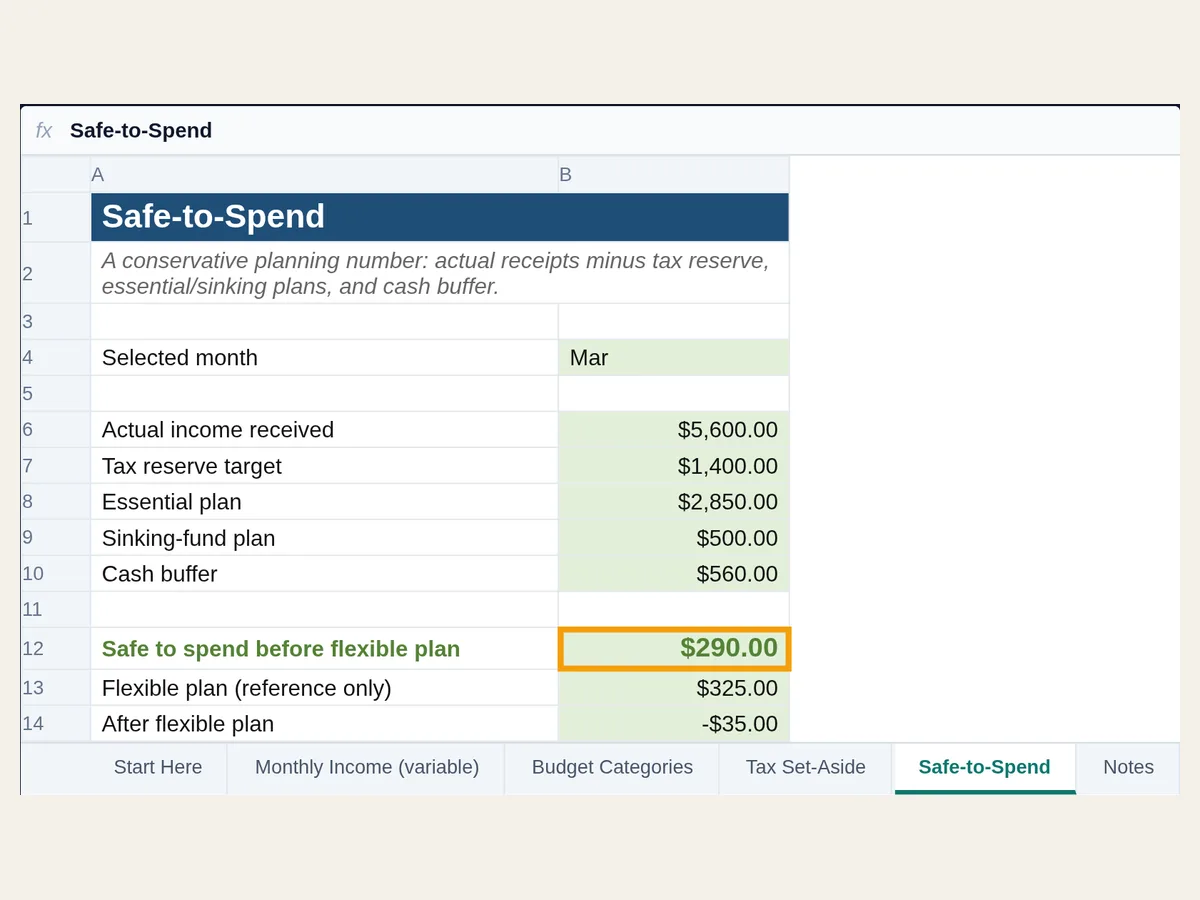
Both columns use the example file's settings: 25% held back for tax and a 10% cash buffer on income received.
| March | February | |
|---|---|---|
| Actually received | $5,600 | $1,500 |
| Tax hold-back at 25% | -$1,400 | -$375 |
| Essentials | -$2,850 | -$2,850 |
| Sinking funds | -$500 | -$500 |
| Cash buffer at 10% | -$560 | -$150 |
| Safe to spend | $290 | $0 |
Example data, made up. March's flexible plan is $325, so the sheet shows you're $35 over and should trim. February had $2,400 invoiced but only $1,500 paid (a $900 invoice was still out), so it falls $2,375 short and shows $0: no flexible spending until money arrives. The 25% rate is the example file's placeholder, not a recommendation.
Tax set-aside
Did you actually move the tax money?
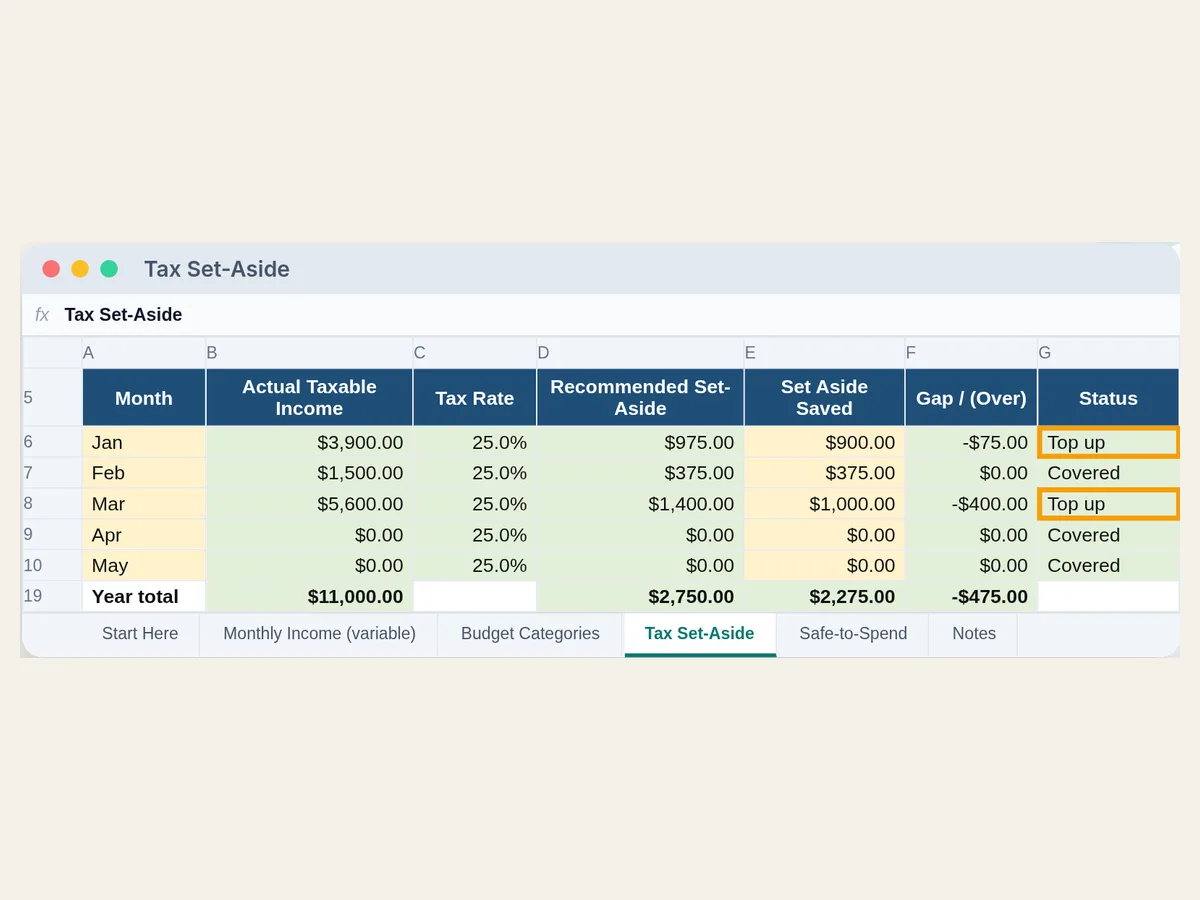
Each month compares what your percentage says to hold back with what you really moved to savings, and says Covered or Top up.
| Month | Taxable income | Hold back | Moved | Status |
|---|---|---|---|---|
| Jan | $3,900 | $975 | $900 | Top up ($75) |
| Feb | $1,500 | $375 | $375 | Covered |
| Mar | $5,600 | $1,400 | $1,000 | Top up ($400) |
| Year so far | $11,000 | $2,750 | $2,275 | $475 to top up |
Example data, made up. Need quarterly due dates and a Schedule C summary too? That's the self-employed tax tracker spreadsheet; this budget only tracks the money you set aside.
Your options
Free templates or this one
We downloaded and opened both free files. If one of them fits, use it.
ReceiptSync paycheck budget, free
- Give every dollar of each paycheck a job, plus an expense log, pay-period history and a tab for budgeting on your minimum expected income. No email needed.
- No tax set-aside line and no expected-vs-received income log. Best if you're paid on a steady cycle.
Excelx variable income budget, free
- Plan from your lowest month in the last six, with four priority tiers from survival to lifestyle. Good if you have six months of history.
- No tax set-aside line. The license is personal use only, and some features sit in a paid Pro version.
This workbook, $12 once
- Income as it actually arrives, a tax hold-back with a monthly top-up check, a cash buffer and a safe-to-spend number for any month.
- No bank sync and no forecasting from past months; you type each payment in.
Sources, checked Oct 29, 2026: ReceiptSync · Excelx. Features change; check their pages.
FAQ
Questions, answered straight
How do you budget when your income changes every month?
Plan from money that has actually arrived, not from invoices you expect. Cover your essentials and your non-monthly bills first, hold back taxes and a small cash buffer, and treat whatever is left as the only money for flexible spending. This workbook does that subtraction for any month you pick.
Does it calculate my taxes?
No. You choose the percentage to hold back (the example file uses 25% as a placeholder) and it applies that to income you mark as taxable. What you actually owe depends on your whole tax picture, so set the rate with your tax plan or a professional. It's a planning tool, not tax advice.
Why does it only count money I've received?
Because an unpaid invoice can't pay rent. The Monthly Income tab has an Expected column and an Actual Received column; Safe-to-Spend reads only Actual Received. In the example, a $900 February invoice that hasn't been paid shows as expected but adds nothing to February's safe-to-spend.
What happens in a month when income doesn't cover the basics?
Safe-to-spend shows $0 instead of a negative number, which is the signal to pause flexible spending and draw on savings. The example's February does exactly that.
Is it a subscription?
No. It's a one-time download from Etsy. There's no account and no bank connection; you type the numbers in.
Does it work in Google Sheets?
Yes. It's a real .xlsx file with live formulas and no macros. Open it in Excel, or in Google Sheets use File → Import → Upload.
Is it only for freelancers?
No. It suits anyone paid unevenly: freelancers, contractors, gig workers, commission sales and seasonal work. Mark income you don't owe tax on as not taxable and it's left out of the tax hold-back.
Know what's safe to spend, even in a slow month.
$12 once on Etsy. Instant download: blank file, filled-in example and a Quick Start PDF.