Orvian Market › Mileage log
Mileage Log Spreadsheet 2027
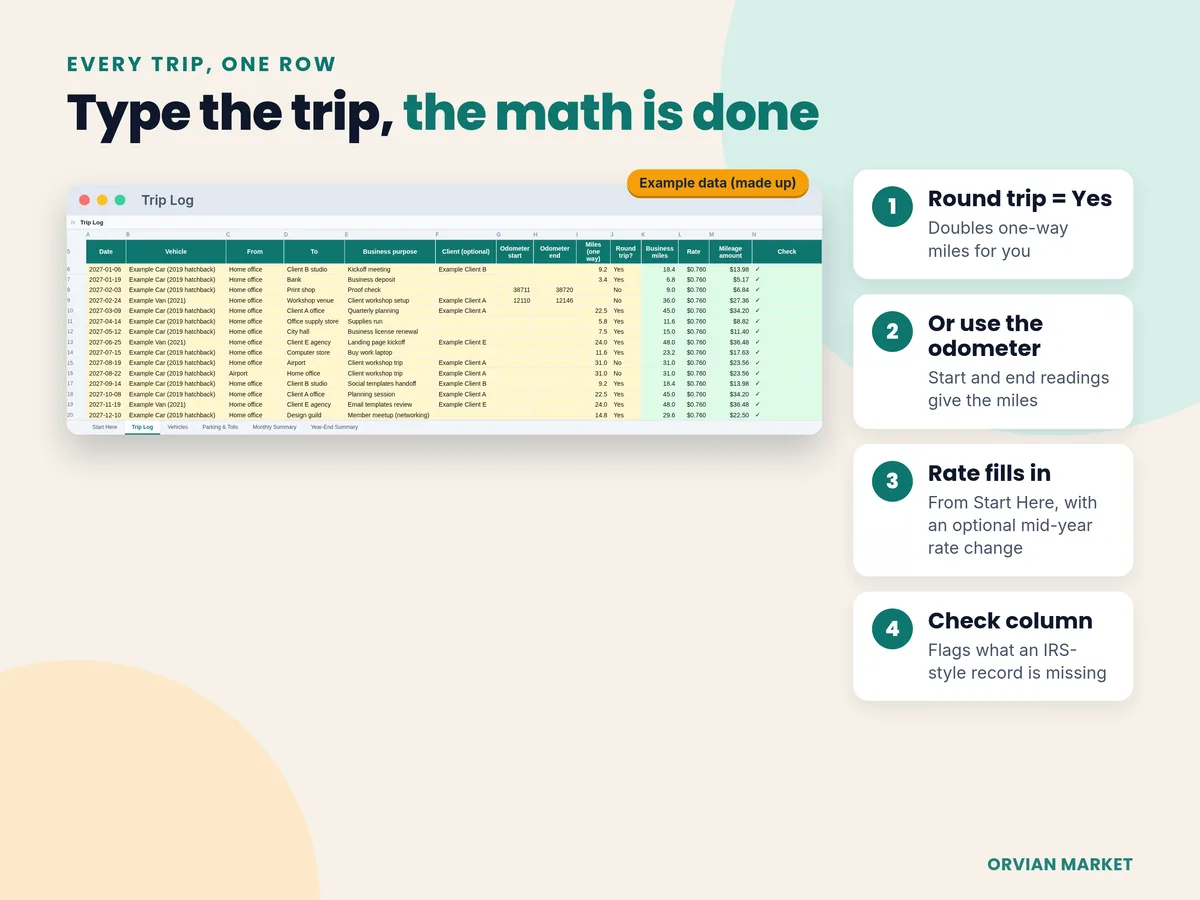
One row per business trip: date, where, why and the miles. Type one-way miles and mark it a round trip, or type the odometer start and end. The sheet applies the IRS rate, adds parking and tolls, and builds a one-page year-end summary for your tax preparer.
$7one-time on Etsy · Excel and Google Sheets
- Trip Log with 600 rows, up to 5 vehicles
- Rate cell plus a second rate for a mid-year change
- Answers the Schedule C vehicle questions (Part IV)
- Blank file, filled-in example and a Quick Start PDF
The record
What the IRS asks a mileage log to show
IRS Publication 463 (Table 5-1) lists what to record for car expenses. Here's each item and where it goes in this file. Our summary, not tax advice.
| Publication 463 asks for | Where it goes in the file |
|---|---|
| The date of each business use | Trip Log: Date |
| Your business destination | Trip Log: From and To |
| The business purpose | Trip Log: Business purpose (a row without one is flagged) |
| The mileage for each business use | Trip Log: one-way miles × round trip, or odometer start and end |
| Total miles for the year | Vehicles: odometer on Jan 1 and Dec 31 |
| The date you started using the car for business | Vehicles: date placed in service |
| The cost of the car and any improvements | Not in this file. Keep the purchase paperwork; it matters most if you use actual costs instead of the standard rate. |
Timing matters too: Publication 463 says to record trips at or near the time, and that a log kept weekly counts as a timely record. Source: irs.gov/publications/p463, chapter 5.
Worked example
A year of made-up trips, totaled
From the example copy that comes with the file.
| Round trip: 9.2 miles one way, Round trip = Yes | 18.4 mi |
| Odometer: 38,711 to 38,720 | 9 mi |
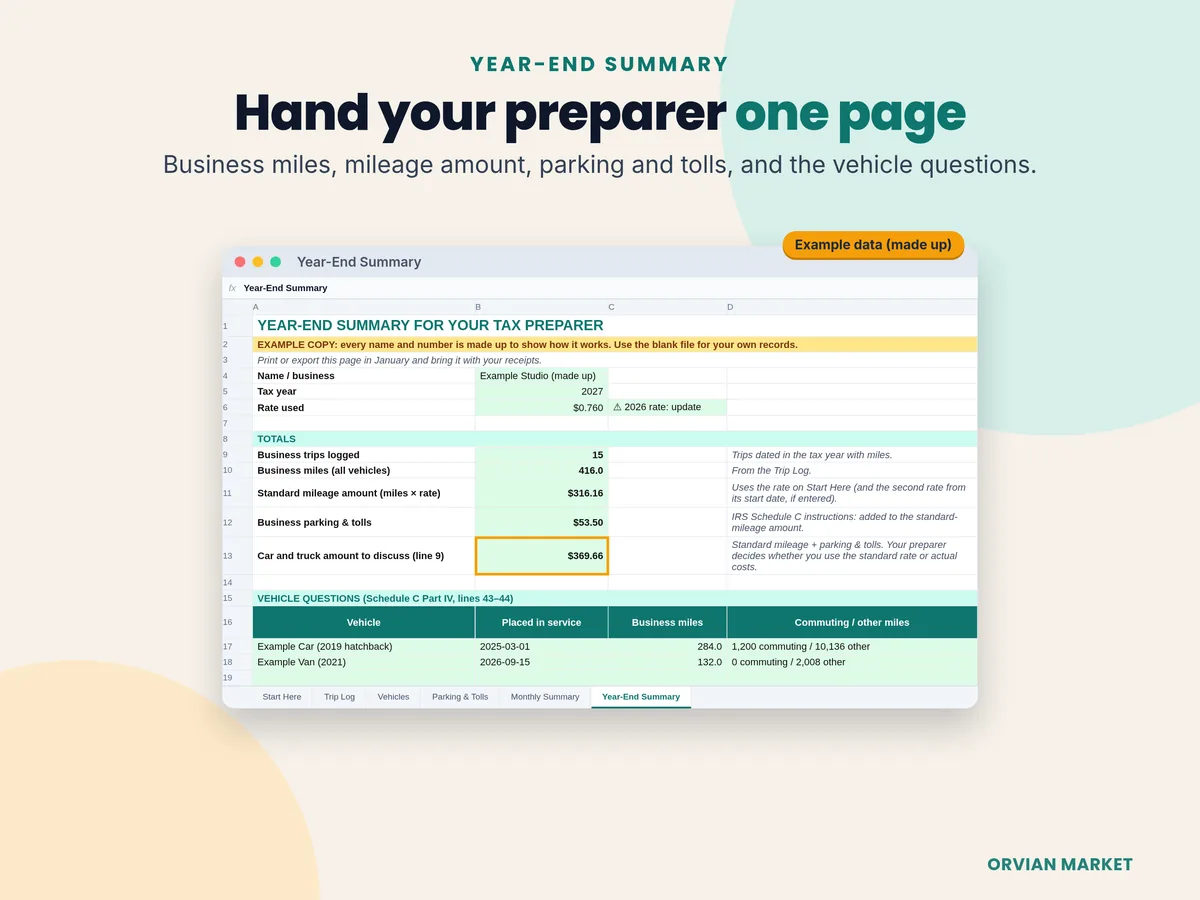
| Business trips logged | 15 |
| Business miles × $0.76 | 416 mi → $316.16 |
| Business parking and tolls | $53.50 |
| Car and truck amount to discuss with your preparer | $369.66 |
Example data, made up. Parking and tolls are added to the standard-mileage amount as the Schedule C instructions (line 9) describe. Your preparer decides whether you use the standard rate or actual costs.
The rate
The IRS rate, and why 2027 isn't in yet
| Period | Business rate | IRS source |
|---|---|---|
| Jan 1 – June 30, 2026 | 72.5¢ a mile | IR-2025-128 (Dec 29, 2025) |
| July 1 – Dec 31, 2026 | 76¢ a mile | Announcement 2026-11 |
| 2027 | not published yet | checked Oct 28, 2026 |
Source: irs.gov standard mileage rates. The file ships with 76¢ and a reminder; type the 2027 rate into one cell when the IRS publishes it and every trip updates. 2026 shows why the second-rate cell exists: the IRS changed the rate on July 1.
Your options
Would a free template or a mileage app do the job?
Maybe. Here's what each option does well, from their own pages on Oct 28, 2026.
Free spreadsheet
- Vertex42's Business Mileage Tracker is free: odometer readings, business purpose, business % of total miles, and a log page to print and keep in the car.
- The copy we downloaded has one table of about two dozen trips, one rate cell (set to $0.55), and no destination column, parking and tolls, or year-end summary.
Free GPS app
- Stride is free and tracks drives by GPS, which suits gig drivers who are on the road all day.
- It has 3.0 stars from about 20,800 Google Play reviews, and some of them report lost or straight-line miles.
Paid GPS app
- MileIQ logs drives automatically: 40 free drives a month, then $11.66 a month billed annually or $13.99 month to month.
- Worth it if you drive a lot and won't type trips.
This file, $7 once
- You type each trip; there's no GPS. In return it doubles round trips, turns odometer readings into miles, flags rows missing a purpose or vehicle, adds parking and tolls, and fills a one-page year-end summary.
- Works offline in Excel or in Google Sheets.
Sources: Vertex42 · Stride on Google Play · MileIQ pricing. Prices and ratings change; check their pages.
FAQ
Questions, answered straight
Is it a subscription?
No. It's a one-time download from Etsy. The apps compared above charge monthly or cap free use; this file is yours to keep.
Does it work in Google Sheets?
Yes. It's a real .xlsx file with live formulas and no macros. Open it in Excel, or in Google Sheets use File → Import → Upload.
Can I use it on my phone?
You can log trips in the Google Sheets app once the file is imported. Setting it up is easiest on a computer. It doesn't track GPS; you type each trip.
Do I need GPS tracking for my mileage log?
Publication 463 doesn't ask for GPS. It asks for a record made at or near the time of the trip, and says a log kept weekly counts as timely. Ask your preparer if you're unsure about your own situation.
Is the 2027 IRS rate filled in?
Not yet. The IRS hadn't published it on October 28, 2026; it announced the 2026 rate on December 29, 2025. The file is prefilled with $0.76 (the July–December 2026 rate), and a check on Start Here reminds you to type the 2027 rate into one cell.
Are commuting miles included?
Driving between home and a regular workplace is generally commuting, not business mileage (Publication 463). The Vehicles tab has a separate commuting estimate for the Schedule C vehicle questions. If you're unsure about a trip, ask your preparer.
Is this tax advice?
No. It's a record-keeping tool. It doesn't decide whether a trip is deductible or file anything. Orvian Market isn't affiliated with the IRS.
Log the trip once. Hand over one page in January.
$7 once on Etsy. Instant download: blank file, filled-in example and a Quick Start PDF.