Orvian Market › Self-employed tax tracker
Self-Employed Tax Tracker Spreadsheet 2027
Keep your 2027 freelance income, expenses and business miles in one workbook, set aside the percentage you choose for each quarterly estimated-tax period, and hand your tax preparer one tidy summary in January.
$15one-time on Etsy · Excel and Google Sheets
- Room for 300 payments and 600 expenses a year
- Expense categories mapped to Schedule C lines
- Mileage log at the IRS rate you enter
- Blank file, filled-in example and a Quick Start PDF
The calendar
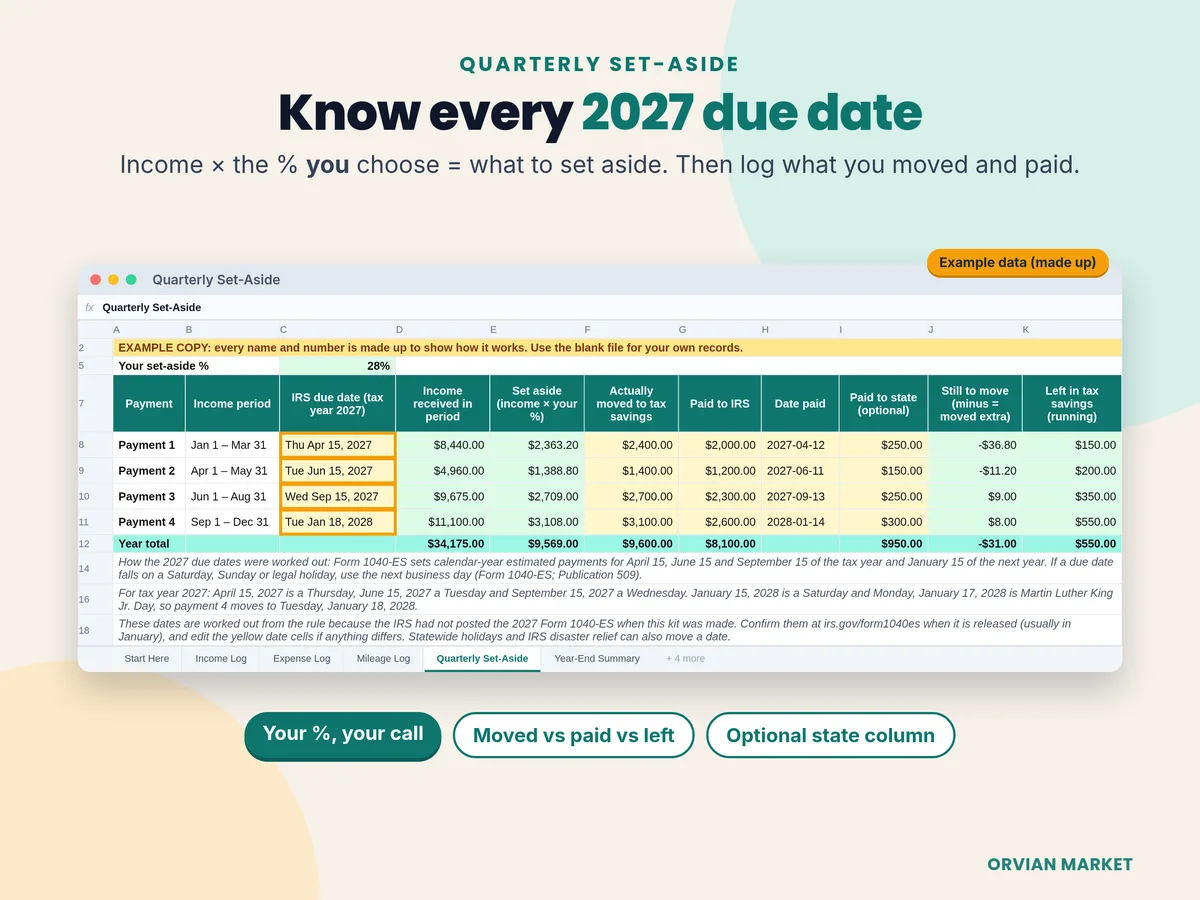
2027 quarterly estimated tax due dates
The IRS splits the year into four uneven payment periods. The June payment covers only April and May, which is why a "quarter" isn't three months here. The kit totals the income you received in each period and applies your set-aside percentage.
| Payment and income period | Due, tax year 2027 | Example income | Set aside at 28% |
|---|---|---|---|
| Payment 1 Jan 1 – Mar 31 | Apr 15, 2027 | $8,440.00 | $2,363.20 |
| Payment 2 Apr 1 – May 31 | Jun 15, 2027 | $4,960.00 | $1,388.80 |
| Payment 3 Jun 1 – Aug 31 | Sep 15, 2027 | $9,675.00 | $2,709.00 |
| Payment 4 Sep 1 – Dec 31 | Jan 18, 2028 | $11,100.00 | $3,108.00 |
| Year | $34,175.00 | $9,569.00 |
Example data, made up; 28% is the example file's placeholder, not a recommendation. Your percentage is your call, ideally set with a tax professional. Dates are worked out from the rule in the 2026 Form 1040-ES and Publication 509 (a due date on a weekend or legal holiday moves to the next business day), because the 2027 Form 1040-ES wasn't posted yet. Periods from IRS estimated tax FAQs, checked Oct 29, 2026.
Worked example
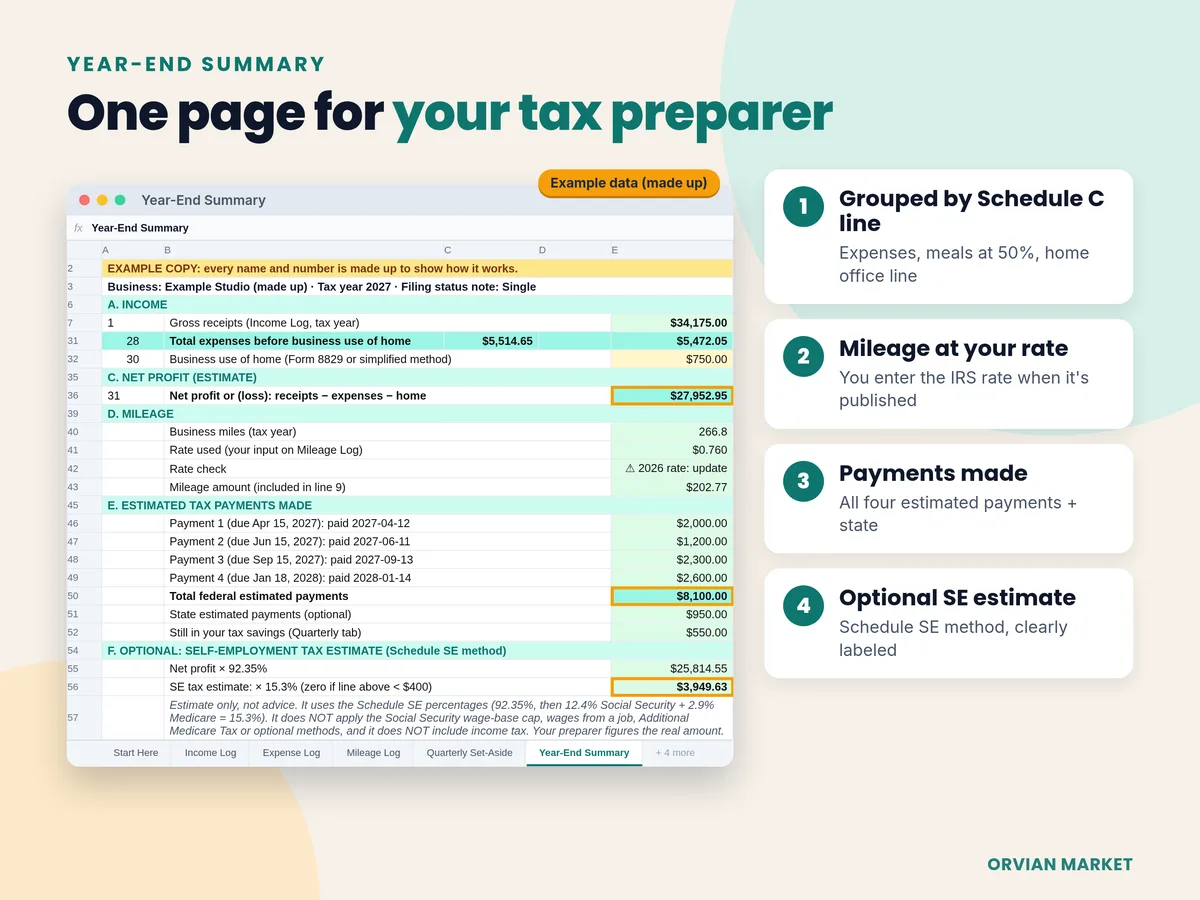
A made-up freelancer's year, on one page
From the Year-End Summary in the example copy that comes with the file.
| Gross receipts (line 1) | $34,175.00 |
| Expenses by Schedule C line, meals $85.20 counted at 50% | $5,472.05 |
| Business use of home (line 30, typed in) | $750.00 |
| Net profit estimate (line 31) | $27,952.95 |
| 266.8 business miles × your rate (in line 9) | $202.77 |
| Federal estimated payments made | $8,100.00 |
| Optional SE tax estimate: $27,952.95 × 92.35% × 15.3% | $3,949.63 |
Example data, made up. The SE tax line skips the Social Security wage-base cap and other adjustments and leaves out income tax; your preparer figures the real amount.
The 1099 check
Compare each 1099 with what you logged
List each client once. When a 1099-NEC or 1099-K arrives, type its amount and the sheet shows whether it matches your Income Log. In the example, a marketplace's 1099-K shows $5,025.00 against $4,775.00 logged, a $250.00 difference, because a 1099-K usually reports gross payments before platform fees (which are logged as expenses). A difference isn't automatically a problem; the sheet asks you to note the reason for your preparer.
Built-in checks also flag rows missing a date, a category or a saved receipt, and dates outside the tax year.
Your options
Free templates, an app, or this kit
BrassWell quarterly tax tracker, free
- A payment log with a set-aside at one percentage, and 2026 quarter totals with due dates and IRS and state payments. No sign-up.
- Covers payments only: no expense log, mileage or year-end summary (we opened the file).
Shoeboxed tax organizer, free
- A prep checklist, a 50-row expense organizer mapped to Schedule C, a Schedule C summary, a home office log and a mileage log. No email needed.
- No income log, quarterly tracker or net profit, and its mileage formula has the 72.5-cent rate typed in (we opened the file).
Wave Starter, $0
- Online accounting with unlimited invoices, bills and bookkeeping records.
- Auto-importing bank transactions and receipt capture are in its Pro plan ($19 a month or $190 a year). It's an account, not a file you keep.
This kit, $15 once
- Income, client 1099 check, expenses by Schedule C line, mileage, all four 2027 payments and a year-end page in one workbook.
- Every entry is typed by you; there's no bank sync. Works offline in Excel or in Google Sheets.
Sources, checked Oct 29, 2026: BrassWell · Shoeboxed · Wave pricing. Features and prices change; check their pages.
FAQ
Questions, answered straight
Does it tell me how much tax I owe?
No. It tracks the percentage you choose to set aside and the payments you actually make. What you must pay each quarter depends on IRS rules (Form 1040-ES and Publication 505) and your whole tax picture, so your preparer or tax software works that out. The Year-End page has an optional self-employment tax estimate using the Schedule SE percentages, clearly marked as an estimate without income tax.
Is it a subscription?
No. It's a one-time download from Etsy. The file is yours to keep.
Does it work in Google Sheets?
Yes. It's a real .xlsx file with live formulas and no macros. Open it in Excel, or in Google Sheets use File → Import → Upload.
Why are the 2027 due dates already filled in?
They're worked out from the IRS rule: April 15, June 15 and September 15 of the tax year and January 15 of the next year, moved to the next business day when one falls on a weekend or legal holiday. January 15, 2028 is a Saturday and January 17 is Martin Luther King Jr. Day, so payment 4 lands on Tuesday, January 18, 2028. The IRS hadn't posted the 2027 Form 1040-ES when the kit was made, so the date cells stay editable; confirm them at irs.gov/form1040es.
What mileage rate does it use?
The one you enter. The 2027 rate wasn't published when the kit was made, so the cell holds the latest published rate, 76 cents a mile for July 1 to December 31, 2026, and flags it until you update it.
Is it for US taxes only?
Yes. The expense categories follow the U.S. IRS Schedule C (Form 1040) for sole proprietors and single-member LLCs filing that way. It isn't set up for Canada, the UK or other countries.
Can I use it for 2028?
Yes. Change the tax year on Start Here and the date checks and totals follow it. Update the due dates and the mileage rate for the new year.
Is this tax advice?
No. It's a record-keeping tool. It doesn't decide whether an expense is deductible or file anything. Keep your receipts and 1099s; the workbook is a log of them, not a replacement.
Start 2027 with every payment, receipt and mile in one place.
$15 once on Etsy. Instant download: blank file, filled-in example and a Quick Start PDF.