Orvian Market › Rate increase emails
Rate Increase Email Templates for Freelancers
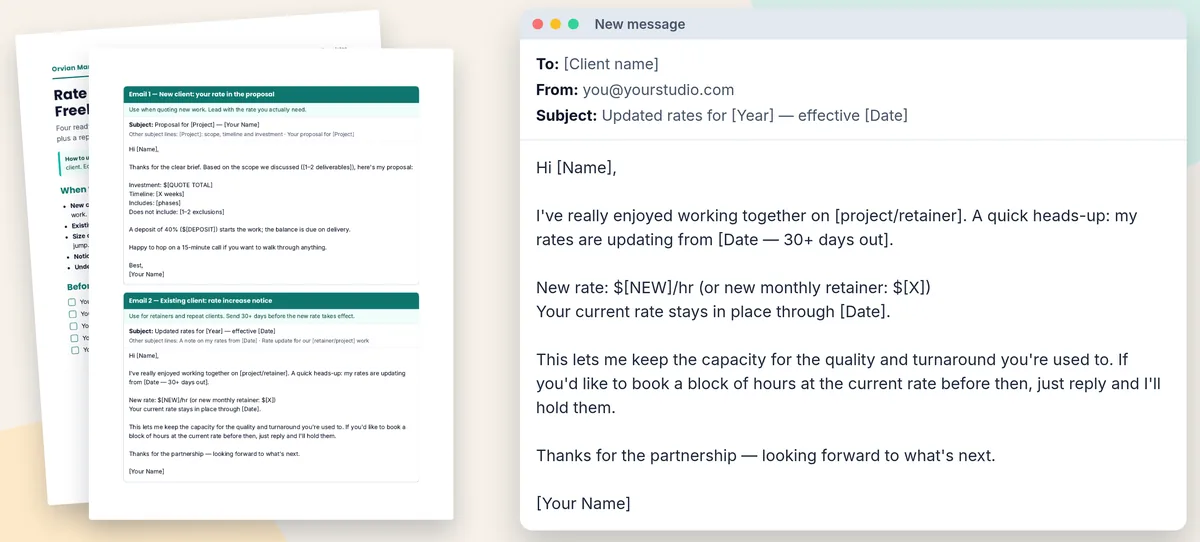
Four short emails for the moment you need to charge more: quoting a new client at your real rate, telling a current client about an increase, passing on work below your floor, and answering pushback with options instead of a discount.
$9one-time on Etsy · editable Word and PDF
- Emails 1 to 4, each with 2–3 subject-line options
- "When to raise your rates" guide: notice, step size, new clients first
- Before-you-send checklist
- Word file opens in Google Docs and Pages; print-friendly PDF
Worked example
A January 1 increase, step by step
Made-up numbers: a freelancer on $85 an hour with a client who uses about 20 hours a month ($1,700). New rates from Jan 1, 2027.
1. Pick the step
| Step | New hourly | 20 h a month | Change |
|---|---|---|---|
| 10% | $93.50 | $1,870 | +$170 |
| 15% | $97.75 | $1,955 | +$255 |
| 20% | $102 | $2,040 | +$340 |
Example data, made up. The file's guide says many freelancers move in steps (for example 10–20%) and to pick what your numbers support. Put the dollar figures in the email, not only the percentage. Not sure what your number should be? The freelance rate calculator spreadsheet works out your minimum hourly rate.
2. Send Email 2 by Dec 2, 2026
The file asks for at least 30 days' notice, so a Jan 1, 2027 start means sending by Dec 2, 2026. Taking the 15% step, the email says the new rate is $97.75/hr, that the current rate stays in place through Dec 31, 2026, and offers to hold a block of hours at the current rate if they book before then. Work already booked usually stays at the current rate; decide that before you send.
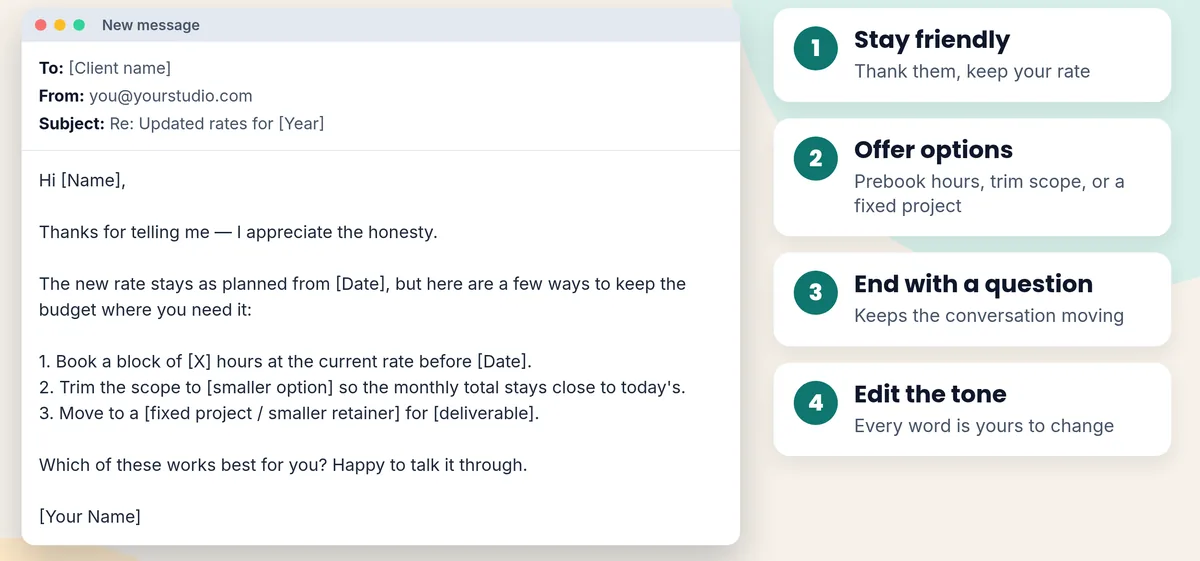
3. If they push back, offer options (Email 4)
| Option in Email 4 | For this client |
|---|---|
| Book a block of hours at the current rate before the date | 20 hours at $85 = $1,700, booked before Jan 1 |
| Trim the scope so the monthly total stays close to today's | 17 hours at $97.75 = $1,661.75 a month, against $1,700 today |
| Move to a fixed project or smaller retainer | A set price for one named deliverable |
Example data, made up. The new rate itself doesn't change in any option; the client chooses how much work to buy.
What's in the file
Four emails, four situations
| When | Subject line | |
|---|---|---|
| 1. New client: your rate in the proposal | When quoting new work | Proposal for [Project] — [Your Name] |
| 2. Existing client: rate increase notice | 30+ days before the new rate | Updated rates for [Year] — effective [Date] |
| 3. Polite pass | When the budget or scope is below your floor | Re: [Project] |
| 4. Reply if a client pushes back | When they ask to keep the old rate | Re: Updated rates for [Year] |
Subject lines as they appear in the file; each email has 2–3 options. Email 1 includes a 40% deposit line you can change.
Your options
Free templates, done-for-you, or this
We read the free ones. If you only need one notice email, they're enough, and SayAnchor's is more thorough than ours.
SayAnchor guide, free
- Eight templates on one web page: hourly, retainer, scope change, grandfathering, short email, reminder before the date, pushback reply, renewal. Worked examples and a notice table.
- Written for firms on hourly or retainer billing; you copy from the web page.
Ben Matthews rate review, free
- A Word and PDF download with a rate assessment worksheet, two emails (existing and new clients) and answers to "can we keep the current rate?"
- Good if you want to work out the new rate on paper first.
Written for you
- If you'd rather not write it yourself, our Fiverr gig writes a rate increase email around your client and numbers.
- Costs more than a template; you send it yourself.
This kit, $9 once
- Covers the new-client proposal and the polite pass as well as the notice and the pushback reply, with a checklist, in one editable Word file and a PDF.
- Four emails, not eight. You're paying for a tidy, offline set you can reuse.
Sources, read Oct 30, 2026: SayAnchor rate increase letter guide · Ben Matthews rate review template. Content changes; check their pages.
FAQ
Questions, answered straight
How do I tell a client I'm raising my rates?
In a short one-to-one email: the new rate as a number, the date it starts, and what happens to work already booked (usually it stays at the current rate). Email 2 in the file does exactly that and offers to hold a block of hours at the current rate before the change.
How much notice should I give before a rate increase?
The file says at least 30 days for existing clients. If your contract sets a notice period, that one wins. For a January 1 increase, 30 days means sending by December 2.
How much should I raise my rates?
The guide in the file notes many freelancers move in steps, for example 10–20%, rather than one big jump, and says to pick what your numbers support. On $85 an hour, 10% is $93.50, 15% is $97.75 and 20% is $102.
What do I say if a client pushes back on the new rate?
Email 4: thank them, keep the new rate, and give three options instead of a discount: book a block of hours at the current rate before the date, trim the scope so the monthly total stays close to today's, or move to a fixed project or smaller retainer. End with a question.
Should I raise rates for new clients first?
Yes, if you're underpriced. The guide calls fixing your new-client rate the change you control fastest: quote it from the first proposal (Email 1) and don't carry old pricing into new work.
Is there a free rate increase letter template?
Yes, several good ones; see the comparison on this page. SayAnchor's guide has eight free templates, including a reply to pushback. This kit is for people who want four tidy, editable emails plus a checklist in one Word file.
What format are the templates?
An editable Word file (.docx), which also opens in Google Docs and Pages, and a print-friendly PDF. Everything in [brackets] is yours to replace.
Say the new number once, clearly.
$9 once on Etsy. Instant download: four emails as an editable Word file and a PDF.