Orvian Market › Inventory spreadsheet
Inventory Spreadsheet with QR Code Labels for Small Business
Know what you have, where it is, and what to reorder. One workbook tracks stock by item, shelf and box, logs every check-in and check-out, prints QR labels, and builds your reorder list and purchase orders.
$24one-time on Etsy · Excel and Google Sheets
- 500 items, 100 locations and boxes, 2,000 stock movements
- QR labels, 30 to a page, with no add-ons or scripts
- Reorder list and purchase order fill in for you
- Blank file, filled-in example and a Quick Start PDF
What's inside
Ten tabs, one job each
Yellow cells are for typing; green cells calculate. Here's what each tab does.
| Tab | What it does |
|---|---|
| Items | Code, name, category, unit, location, supplier, unit cost, min qty, reorder qty and today's count. On hand, stock value and Low/Out status work themselves out |
| Locations | Rooms, shelves, boxes, bins and vehicles. Put a box inside a shelf and it shows as "Shelf A › Box 001", with the items, units and value in each |
| Stock Log | One row per movement: In, Out or Adjust, with who and why. A running "on hand after" count on every row, so a tool checked out to a person is easy to trace |
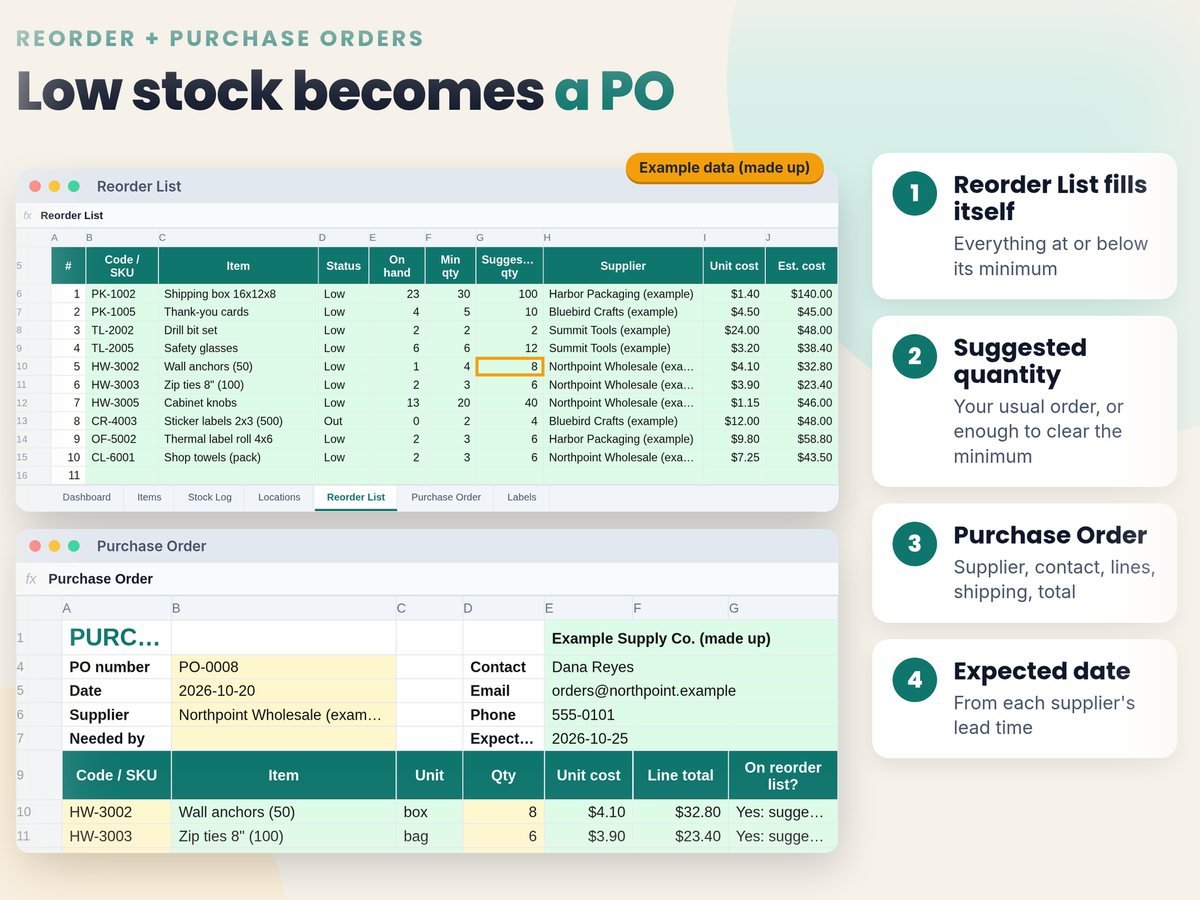
| Reorder List | Everything at or below its minimum, with a suggested quantity, supplier and estimated cost |
| Purchase Order | Pick a supplier and item codes; contact, costs, an expected date from the supplier's lead time and totals fill in. Print or save as PDF |
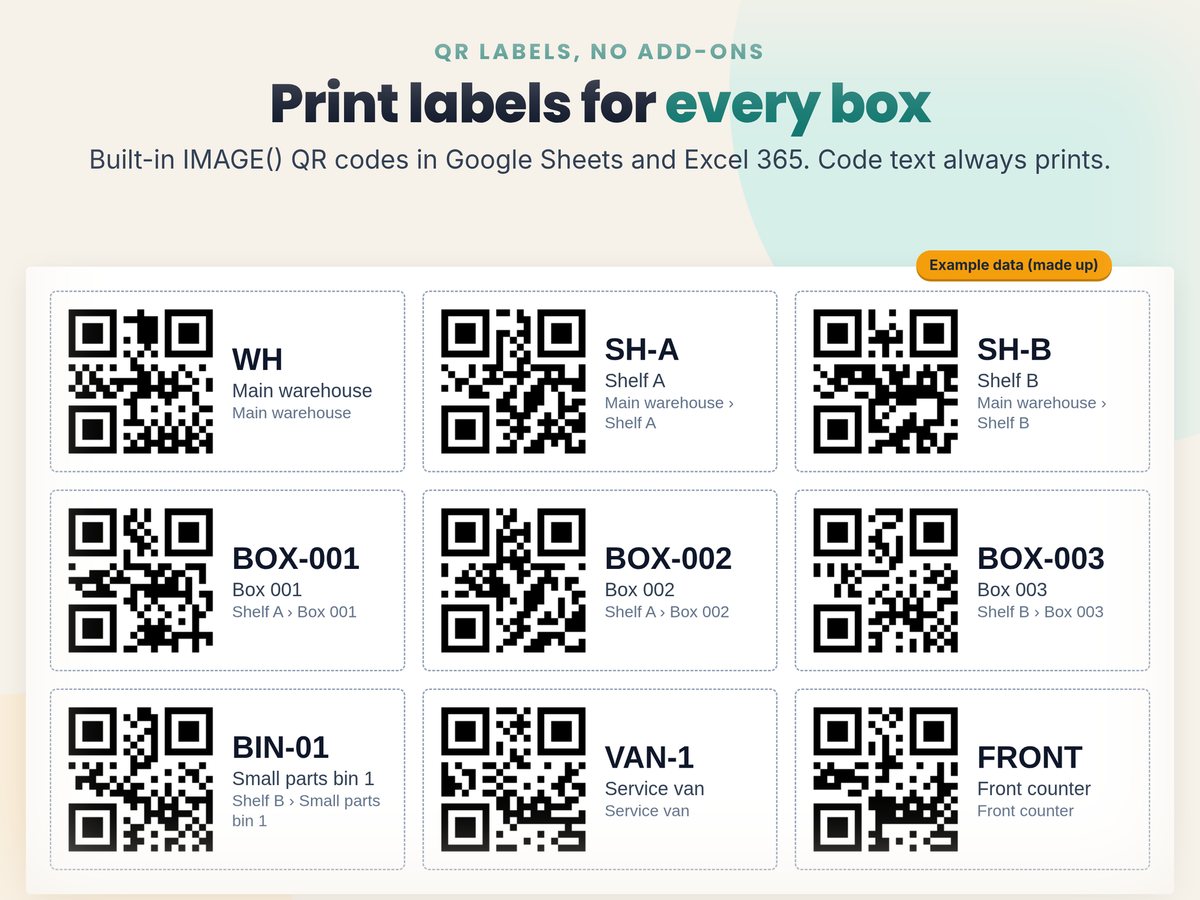
| Labels | 30 QR labels per page for items or locations, each with the code in large text, the name and the location |
| Dashboard | Items, units on hand, stock value at cost, low and out-of-stock counts, the reorder cost, units in and out over the last 30 days, totals by category |
| Suppliers, Start Here, Lists | Supplier contacts and lead times, your setup, and the dropdown lists you can edit |
Built-in checks flag duplicate codes, unknown locations, and counts that would go below zero.
Worked example
A made-up supply room, from the example copy
These numbers come from the filled-in example file that comes with the download.
| Items tracked / units on hand | 22 / 626 |
| Stock value at cost | $1,063.85 |
| Wall anchors: started at 3, 2 checked out | 1 on hand, min 4: Low |
| Suggested reorder: the larger of reorder qty 8 or 4 − 1 + 1 | 8 |
| Reorder List: 9 low + 1 out | $523.90 estimated |
| PO-0008 to Northpoint: 3 lines + $12 shipping, expected 5 days out (its lead time) | $111.70 |
Example data, made up. Box 001 sits on Shelf A and holds 2 items: 238 units worth $214.95 at cost.
QR labels
How the QR codes work, and where they don't
Google Sheets and Excel 365
- Each QR is drawn by the built-in IMAGE() function. No add-ons, scripts or macros.
- In Google Sheets, click Allow access on the yellow banner once; until then the QR cells show a short note.
Older Excel (2016–2021)
- The QR cells show a note instead. Click the QR image link on each row to open the QR as a picture, or print the Labels tab from Google Sheets.
- The code text always prints, so every label stays readable.
The QR pictures come from a free public QR image service (quickchart.io by default, or api.qrserver.com). It only receives the label text, never your quantities, costs or suppliers, and it needs an internet connection to draw them.
Your options
Free templates, an app, or this file
Each has a place. Here's what they say they do, from their own pages on Nov 3, 2026.
Vertex42 Inventory Control, free
- Excel: locations, minimum stock, on hand, on order and backorder, highlights items at their reorder level.
- Comes with a physical count sheet, an inventory label sheet and supplier contacts.
FitSmallBusiness template, free
- Excel and Google Sheets: inventory list, suppliers, purchase records, low stock report and purchase orders.
- Its Google Sheets version adds a barcode generator, barcode printing and phone barcode counting.
Sortly app
- Free for 100 items and 1 user. Advanced is $49 a month billed monthly ($288 for the first year on the yearly offer) for 500 items and QR label creation; purchase orders start on Ultra at $149 a month.
- Its feature list includes in-app barcode and QR scanning, automatic sync and email alerts; check which plan has the ones you need.
This file, $24 once
- Nested locations and boxes, a check-in/check-out log with who and why, QR labels, a reorder list and purchase orders, for 500 items.
- A spreadsheet, not an app: no in-app scanner, automatic sync or alerts.
Sources: Vertex42 · FitSmallBusiness · Sortly pricing. We haven't compared their files cell by cell. Features and prices change; check their pages. Sortly is a trademark of its owner; we aren't affiliated with it.
Price check
Why $24 when Etsy has inventory spreadsheets for $3?
Fair question. If you need a list of items with counts and a low-stock flag, a $2 to $6 one may be enough. Here's what we saw on Etsy, signed out, on Nov 3, 2026, and what the extra pays for here.
| Option | Price seen |
|---|---|
| Top non-ad inventory trackers in Etsy's "inventory templates" and "inventory spreadsheet" results. Most shown at 30–75% off; Google Sheets, some with Excel, per their titles. | $1.47–$5.95 |
| ToolwiseDigital Small Business Inventory Management on Etsy, not on sale: inventory log with reorder status, dashboard, Start Here tab; Google Sheets and Excel. | $14.99 |
| CleanPixel Studios Small Business Inventory Tracker: 13 tabs including sales with cost of goods sold, stock audit, pick list and purchase orders (ordered vs received); 8 Etsy reviews. | $19.99 |
| This file. $18 during our shop-wide Etsy sale, which ends Nov 17, 2026. | $24 |
Their features come from their own listing text; we haven't bought these files. Sources: Etsy "inventory templates" and "inventory spreadsheet" (prices from search results) · ToolwiseDigital · CleanPixel Studios. Prices change; check their pages.
What $24 pays for
- QR labels for items and for boxes, 30 to a page, drawn without add-ons in Google Sheets and Excel 365.
- Locations inside locations: a box on a shelf, a bin in a van, with the items, units and value in each.
- A check-in/check-out log with who and why, and a running count on every row.
- A reorder list with suggested quantities, and a purchase order that fills in the supplier, costs and expected date.
- Checks for duplicate codes, unknown locations and counts below zero.
- 500 items, 100 locations, 2,000 movements, a filled-in example and a Quick Start PDF.
Pick something else if
- You need sales, cost of goods sold and profit per product: this file doesn't track sales prices. CleanPixel's tracker lists those, and INDZARA's Retail Business Manager covers orders, invoices and finance.
- You want a scan to change the count by itself: that takes an inventory app such as Sortly, which has a free plan for up to 100 items.
- You only need items and counts on one shelf: a $3 Etsy tracker or Vertex42's free template will do.
Not sure? Buy ours, and if it isn't what you expected, message us on Etsy within 14 days and we'll fix it or refund you. INDZARA's inventory templates list at $30 to $59.
FAQ
Questions, answered straight
Is it a subscription?
No. It's a one-time download from Etsy. The file is yours to keep; there's no monthly fee.
Does it work in Google Sheets?
Yes. It's a real .xlsx file with live formulas and no macros. In Google Sheets use File → Import → Upload, then click Allow access on the yellow banner once so the QR codes can load.
Do the QR codes work in Excel?
In Excel 365, yes: they're drawn with the built-in IMAGE() function. In older Excel (2016–2021) the QR cells show a note instead; click the QR image link on each row to open the QR as a picture, or print the Labels tab from Google Sheets. The code text always prints.
Can I scan a label with my phone?
Your phone camera reads the code on the label (for example BOX-001), and you search for it in the sheet. The Quick Start also shows an optional free Google Form set-up, so a scan opens a form with the code filled in. It isn't an app: scanning doesn't change the stock count by itself.
How many items does it hold?
500 items, 100 locations and boxes, 2,000 stock movements, 30 suppliers and 20 lines per purchase order. The Reorder List shows up to 60 items at a time.
Does it track sales and profit?
No. It tracks stock: what you have, where it is, what came in and went out, and what to reorder. Stock value uses the unit cost you type. If you need revenue, cost of goods sold and profit per product, pick one of the trackers named above that lists those.
Is this accounting or tax software?
No. It's a record-keeping tool, not accounting, tax or financial advice. The stock value isn't an inventory valuation method for your books.
Know what's on the shelf before you reorder.
$24 once on Etsy. Instant download: blank file, filled-in example and a Quick Start PDF.